


EventON – WordPress event calendar plugin #1 best selling
Bạn muốn tạo website sự kiện/hội nghị/festival nhưng WordPress event plugins phức tạp, đắt, hoặc chỉ hỗ trợ basic calendar? The Events Calendar là lựa chọn lớn nhưng đắt ($999/năm unlimited sites) và cần mua add-ons riêng. WP Simple Events quá cơ bản, không ticketing, không repeating events.
EventON là giải pháp hoàn hảo: #1 best selling event calendar CodeCanyon (63k+ installations kể từ 2011). Unlimited events, repeating events, virtual events, Google Maps, PayPal ticketing, Zoom integration, WooCommerce, event organizers, custom categories. Mua 1 lần ($25), dùng mãi. Free version đầy đủ, Pro version $25-$149/năm. 4.8/5 rating, 6300+ reviews từ trusted users.
✨ Điểm nổi bật EventON
- Unlimited event creation – không giới hạn: Tạo vô số sự kiện (hội nghị, festival, workshop) mà không bị limit. Free & Pro version unlimited
- Repeating events – event tự động lặp lại: Daily, weekly, monthly, yearly repeating. Create weekly yoga class → auto-repeat 52 weeks. No manual duplication
- Virtual events + Zoom integration – perfect webinar/online conference: Mark event as virtual, add Zoom link → attendees join meeting from event card
- PayPal & WooCommerce ticketing – bán vé trực tiếp: Event Tickets addon unlock ticket sales, QR codes, seat booking, dynamic pricing
- Google Maps integration – sự kiện hiển thị trên bản đồ: Event location auto-show on Google Maps with pins, directions, custom styling
- Event organizers & speakers – quản lý nhân sự: Save organizer/speaker info, display on event card, link to organizer archive
- 63k+ installations, 4.8/5 rating – most trusted event plugin: Best-selling on CodeCanyon 2011-2025. Real users, real reviews, real success stories
Tính năng & lợi ích EventON
Unlimited event creation – tạo platform sự kiện lớn
Không giới hạn số event:
- Single day events: Concert 1/5/2025, 19:00
- Multi-day events: Festival May 1-5, 2025
- All-day events: Workshop full day (no specific time)
- Month-long / Year-long events: “Ramadan” month-long, “New Year Celebration” year-long
- Repeating events: Weekly yoga class repeat 52 weeks
- Virtual + Physical: Hybrid events (in-person + online)
Use case: Conference organizer create 100+ events (keynotes, workshops, networking, breakouts) = EventON handle unlimited. WP Simple Events would die.
Repeating events – event tự động lặp lại, tiết kiệm thời gian
Tính năng repeating events mạnh:
- Daily: “Daily standup 10 AM” → repeat every day
- Weekly: “Monday yoga” → repeat every Monday for 52 weeks
- Monthly: “First Friday networking” → repeat 1st Friday of every month
- Yearly: “Annual conference” → repeat every year
- Custom: “Every 2 weeks on Tuesday” → advanced custom repeat
- Until date: Set repeat end date. Ví dụ: repeat daily until Dec 31
Lợi ích: Organizer create event once → repeat rule apply → 52 week instances auto-generated. Save 30+ hours manual event duplication. Update event title once → all repeat instances update.
Virtual events + Zoom integration – webinar/online conference
Virtual event features:
- Mark event as virtual: Checkbox “Virtual event” on event edit
- Zoom OAuth integration: Connect Zoom account → auto-create Zoom meeting
- Add Zoom link to event: Paste Zoom link → event card display “Join Zoom Meeting” button
- Post-event content: After event end, show recording, transcript, slides
- Hybrid support: Event is both physical (venue) + virtual (Zoom) → attendees choose mode
Ví dụ thực tế: Non-profit host monthly training webinar: Create event → Mark virtual → Add Zoom link → Attendees register → On event day, click “Join Zoom” → Live training. No separate Zoom plugin needed.
PayPal & WooCommerce ticketing – bán vé từ calendar
Event Tickets addon (paid):
- PayPal integration: Attendees pay via PayPal, ticket email auto-sent
- WooCommerce integration: Create ticket as WooCommerce product, link to event
- QR codes: Each ticket get unique QR code for check-in
- Seat booking: Limited seats per event → attendees pick seat → auto-reduced inventory
- Dynamic pricing: Early bird discount, group rates, VIP pricing
- Ticket variations: VIP ticket $100, Regular $50, Student $25 → attendees choose
- Reminder emails: Auto-send reminder 24h before event
Use case: Music festival sell 1000 tickets: Early bird (first 100) $30, regular $50, VIP $100. EventON auto-manage inventory, send reminders, generate QR codes for gate check-in. Revenue tracking built-in.
Google Maps integration – sự kiện hiển thị trên bản đồ
Maps features:
- Location by address: Type venue address → Google Maps auto-geocode
- Location by lat/long: Paste coordinates manually (if address not available)
- Save location: Save “Main Hall” location → reuse in 100 events
- Event card maps: Show mini-map on event card
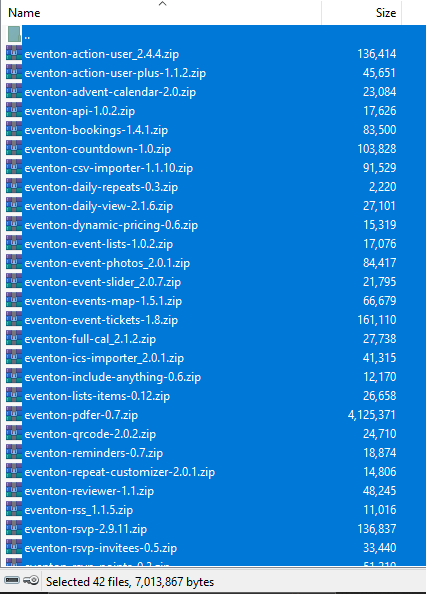
- EventMap addon: Display all events on full-page map. Zoom, pan, click event → show event card
- Custom styling: Google Maps custom style (dark mode, custom colors)
Benefit: Attendees see exact venue location. Can get directions (Google Maps navigation). Multiple event pins on map → easy compare nearby events.
Event organizers & speakers – manage people
Organizer management:
- Create organizer profile: Name, bio, contact, social links, avatar
- Assign to events: Link organizer to 1-100 events
- Display on event: Event card show organizer name, avatar, bio link
- Speakers addon: Add speakers + their schedule. Ví dụ: “John Smith (9-10 AM keynote), Jane Doe (10-11 AM workshop)”
- Organizer archive: Click organizer → see all events by this person
Use case: Conference 50+ speakers. Create speaker profile once → assign to multiple events → display consistently. Attendees see speaker bios, past talks, experience.
Multiple calendar layouts & customization – flexible design
Display options:
- Month view: Traditional calendar grid. AJAX month navigation
- Week view: FullCal addon – show week view, day view
- List view: Events as list sorted by date
- Upcoming events: Show “Next 10 events” section
- Grid layout: Events as cards in grid (like Airbnb)
- Color by category: Different event categories = different colors
- EventTop designer: Customize top section of event (date, location, attendees count)
- EventCard designer: 7+ card layouts choose from
Flexibility: Different page, different layout. Homepage show month view. Events page show list view. Archive page show grid cards. Zero code customization.
Event search & filtering – attendees find what they want
Search/filter features:
- Filter by category: Checkbox “Music”, “Tech”, “Food” → show only events in that category
- Filter by organizer: Select speaker/organizer → show their events
- Filter by location: Show events near me
- Search box: Type event name → real-time search
- Sort options: Sort by date (asc/desc), popularity, featured first
- Date filter: Show events between date range
Benefit: Attendees easily find events they care about. No scrolling 100s of irrelevant events. Better UX = higher engagement.
🚀 Sẵn sàng tạo platform sự kiện?
EventON giúp bạn xây dựng event calendar chuyên nghiệp: unlimited events, repeating events, ticketing, virtual events, Zoom integration – tất cả in 1 plugin.
💡 Mẹo: Hoặc thử EventON Lite miễn phí trước.
Tương thích kỹ thuật
| Tiêu chí | Yêu cầu/Phiên bản hỗ trợ |
|---|---|
| WordPress | 6.0+ (khuyến nghị 6.2+) |
| PHP | 8.0+ (khuyến nghị 8.1–8.2+) |
| MySQL | 5.7+ (MariaDB 10.3+) |
| Page Builders | Elementor (widget), Gutenberg (block), WPBakery |
| E-commerce | WooCommerce 7.0+ (ticketing addon) |
| Payment Gateway | PayPal, WooCommerce Payments, Stripe (via WC) |
| Maps | Google Maps API (key required) |
| Virtual Events | Zoom API (OAuth integration) |
| Multi-language | WPML, Polylang, RTL support |
| Mobile | Fully responsive, mobile-optimized |
| Performance | Lightweight, AJAX-driven, cache-friendly |
| Phiên bản hiện tại | 5.0.2 (cập nhật October 2025) |
Cách cài đặt & kích hoạt EventON
Bước 1: Download EventON plugin
Chọn 1 trong 2 phiên bản:
- Free (EventON Lite): Truy cập WordPress.org/plugins/eventon-lite, bấm Download
- Pro (Full version): Mua từ CodeCanyon ($25) hoặc myeventon.com, nhận file .zip qua email
Bước 2: Upload lên WordPress
Vào WordPress Admin > Plugins > Add New > Upload Plugin, chọn file .zip, bấm Install Now.
Bước 3: Activate plugin
Bấm Activate. EventON sẽ thêm menu vào WordPress Admin sidebar.
Bước 4: Configure basic settings (optional)
Vào EventON > Settings, cấu hình:
- Google Maps API key: (if using maps) – get from Google Cloud Console
- Zoom OAuth: (if using virtual events) – connect Zoom account
- Calendar layout: Choose default layout (month, week, list)
- Date/time format: Set preferred format for your region
- Timezone: Set site timezone
Bước 5: Tạo first event
Vào EventON > Add New Event, fill event details:
- Event title
- Start date/time, end date/time
- Event location (address or lat/long)
- Event organizer/speaker
- Event category/tags
- Featured image
- Event description
- Virtual (if virtual event, add Zoom link)
- Repeating options (if repeating event)
Bấm Publish.
Bước 6: Add calendar to page
Create new page, thêm calendar:
- Shortcode: Type
[add_eventon]in page content - Elementor: Drag EventON widget, configure options
- Gutenberg: Add EventON block, select calendar
Bước 7: Test & publish
- Publish page
- Check calendar on front-end
- Verify event displays, month navigation works, interactivity smooth
- Test event interactions (expand, click, filters)
- Done!
💡 Mẹo: EventON có detailed documentation & support helpdesk. Support included 1 year với license purchase ($8-40/year renewal).
Câu hỏi thường gặp (FAQ)
1. EventON có miễn phí không?
EventON Lite miễn phí (WordPress.org) có unlimited events, repeating, virtual, Google Maps. Full version ($25 CodeCanyon, myeventon.com offers) unlock Zoom, PayPal, WooCommerce ticketing, RSVP, advanced addons. Recommended cho business event sites.
2. EventON có unlimited events không?
Có. Both free & pro: unlimited event creation, no limits. Tạo 1,000 events không problem.
3. EventON có repeating events không?
Có. Daily, weekly, monthly, yearly, custom repeat. Create event once → repeat rule auto-generate instances. Perfect recurring events (yoga classes, meetups).
4. EventON có virtual events không?
Có. Mark event as virtual, add Zoom link (or any video URL). Zoom OAuth integration available (Pro). Hybrid events supported.
5. EventON có ticketing không?
Có. Event Tickets addon (paid) unlock: PayPal, WooCommerce, QR codes, seat booking, dynamic pricing, reminders. Sell tickets directly from calendar.
6. EventON có Google Maps không?
Có. Set location address or lat/long → Google Maps display. EventMap addon show all events on full-page map.
7. EventON so với The Events Calendar thế nào?
EventON: Simpler, cheaper ($25 vs The Events Calendar $999/yr), unlimited native, built-in Zoom. The Events Calendar: Larger add-on ecosystem, better for enterprise (but pricey). EventON better value for most sites.
8. EventON có organizers & speakers không?
Có. Create organizer/speaker profiles, assign to events, display on event cards, create archive pages. Speakers addon add schedule management.
9. EventON có Elementor support không?
Có. Elementor widget available – drag EventON calendar vào page, no code needed. Full shortcode options configurable.
10. EventON install/support tốt không?
Rất tốt. 63k+ installations (best-selling CodeCanyon 2011-2025). 4.8/5 rating, 6300+ reviews. Support included 1 year, renewal $8-40/year. Helpdesk.ashanjay.com very responsive.
✨ Khởi động tạo event calendar chuyên nghiệp hôm nay
Unlimited events • Repeating events • Virtual events + Zoom • Ticketing • 63k+ installations
WordPress 6.0+ • PHP 8.0+ • Elementor & Gutenberg compatible • 1 year support • 4.8/5 rating – 6300+ reviews


Đánh giá
Chưa có đánh giá nào.